


- Stock: In Stock
- Model: T182.DHT21
DHT21 (AM2301) Digital Temperature & Humidity Sensor Module🌡️💧
The DHT21 (AM2301) is a reliable, dual-purpose digital temperature and humidity sensor designed for precision environmental monitoring. Ideal for Arduino, Raspberry Pi, and other microcontroller-based projects, this compact module delivers accurate readings with low power consumption, making it perfect for embedded and battery-powered electronics applications.{IMG_TAG_0}
🧰 Overview
The DHT21 / AM2301 integrates a capacitive humidity sensor and a thermistor to measure ambient air conditions. It outputs calibrated, digital data via a simple single-wire interface, eliminating the need for analog inputs and complex signal conditioning. This sensor is widely used in modules and electronics components kits for environmental monitoring and automation.
⚙️ Key Specifications
- Temperature Range: -40 to +80°C (accuracy ±0.5°C)
- Humidity Range: 0 to 100% RH (accuracy ±3% RH)
- Resolution: 0.1 (temperature and humidity)
- Power Supply (Voltage): 3.3V to 5.5V
- Low Power Consumption: suitable for battery-powered designs
- Digital Output: single-wire (custom) communication protocol
- Typical Response/Update Time: less than 2 seconds
🔌 Pin Configuration
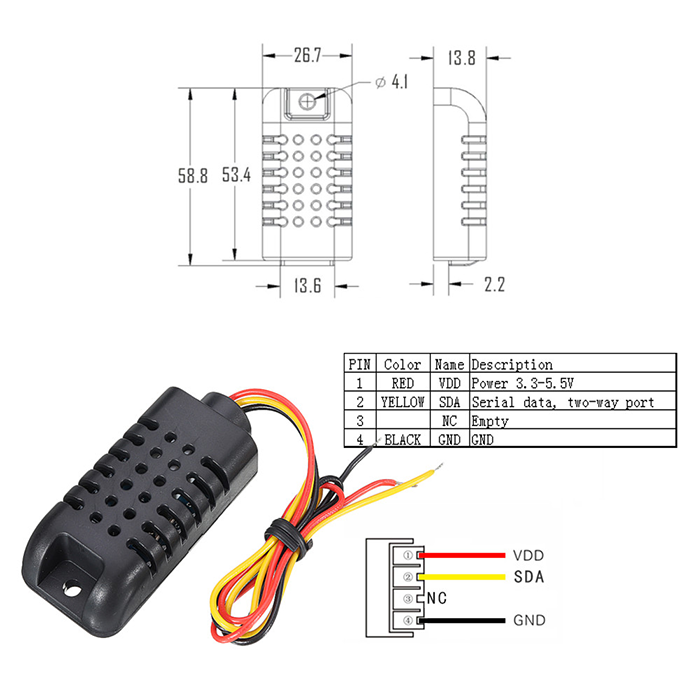
The DHT21 sensor typically provides three connections:
- VCC: Power supply (3.3V to 5.5V)
- GND: Ground
- DATA: Digital signal output
Note: A pull-up resistor (4.7 kΩ to 10 kΩ) from DATA to VCC is required for reliable communication.
📦 Typical Applications
- Weather stations: ambient temperature and humidity monitoring
- HVAC systems: heating, ventilation, and air conditioning control
- Home automation: smart environmental sensing
- Agriculture: greenhouse and soil environment monitoring
- Industrial monitoring: warehouses and factory environments
🔧 Wiring Instructions (Arduino)
Connect the DHT21 to an Arduino as follows:
- VCC → Arduino 5V (or 3.3V)
- GND → Arduino GND
- DATA → Arduino digital I/O (e.g., pin 2)
- Add a 4.7 kΩ–10 kΩ pull-up resistor between VCC and DATA
🖥️ Compatibility Tips (Raspberry Pi & Other MCUs)
- For Raspberry Pi (3.3V logic), either power the sensor at 3.3V or ensure the DATA pull-up is to 3.3V to protect the GPIO.
- Works with popular microcontrollers such as Arduino, ESP8266, ESP32, STM32, and more.
🧪 Example Code (Arduino)
Install the Adafruit DHT library via the Arduino IDE Library Manager, then upload this example:
#include "DHT.h"// Sensor configuration
#define DHTPIN 2        // Digital pin connected to the sensor
#define DHTTYPE DHT21   // DHT 21 (AM2301)DHT dht(DHTPIN, DHTTYPE);void setup() {
  Serial.begin(9600);
  Serial.println("DHT21 (AM2301) test");
  dht.begin();
}void loop() {
  // Wait a few seconds between measurements
  delay(2000);  // Read humidity (%) and temperature (°C)
  float humidity = dht.readHumidity();
  float temperature = dht.readTemperature(); // Celsius  // Validate readings
  if (isnan(humidity) || isnan(temperature)) {
    Serial.println("Failed to read from DHT21 sensor!");
    return;
  }  // Print results
  Serial.print("Humidity: ");
  Serial.print(humidity, 1);
  Serial.print(" %   ");
  Serial.print("Temperature: ");
  Serial.print(temperature, 1);
  Serial.println(" °C");
}
✅ Calibration & Best Practices
- Place the sensor where there is adequate airflow for accurate readings.
- Avoid direct sunlight or proximity to heat sources to prevent drift.
- Use a proper pull-up resistor and keep signal wires short to reduce noise.
- For critical applications, periodically verify and recalibrate against a reference instrument.
The DHT21 (AM2301) is a versatile, dependable electronics component for projects requiring precise temperature and humidity measurements. Its straightforward digital interface and broad voltage range make integration simple across Arduino, Raspberry Pi, and other microcontroller platforms.